搜索到
154
篇与
的结果
-
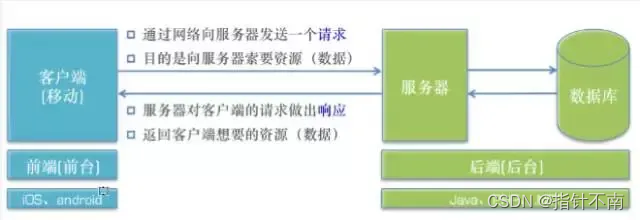
 一文搞懂网络知识,IP、子网掩码、网关、DNS、端口号 @TOC网络的基本概念客户端:应用 C/S(客户端/服务器) B/S(浏览器/服务器)服务器:为客户端提供服务、数据、资源的机器请求:客户端向服务器索取数据响应:服务器对客户端请求作出反应,一般是返回给客户端数据URLUniform Resource Locator(统一资源定位符)网络中每一个资源都对应唯一的地址——URLIP 、子网掩码 、路由器 、DNSIP地址IP地址是IP协议提供的一种统一的地址格式,它为互联网上的每一个网络和每一台主机分配一个逻辑地址,以此来屏蔽物理地址(每个机器都有一个编码,如MAC上就有一个叫MAC地址的东西)的差异。是32位二进制数据,通常以十进制表示,并以“.”分隔。IP地址是一种逻辑地地址,用来标识网络中一个个主机,在本地局域网上是惟一的。IPIP(网络之间互连的协议)它是能使连接到网上的所有计算机网络实现相互通信的一套规则,规定了计算机在因特网上进行通信时应当遵守的规则。任何厂家生产的计算机系统,只要遵守IP协议就可以与因特网互连互通。IP地址有唯一性,即每台机器的IP地址在全世界是唯一的。这里指的是网络上的真实IP它是通过本机IP地址和子网掩码的"与"运算然后再通过各种处理算出来的(要遵守TCP协议还要加报文及端口什么的,我没有细追究,现在还用不上,反正暂时知道被处理过的就行了),顺便教大家查自己真实IP的方法:子网掩码要想理解什么是子网掩码,就不能不了解IP地址的构成。互联网是由许多小型网络构成的,每个网络上都有许多主机,这样便构成了一个有层次的结构。IP地址在设计时就考虑到地址分配的层次特点,将每个IP地址都分割成网络号和主机号两部分,以便于IP地址的寻址操作。IP地址的网络号和主机号各是多少位呢?如果不指定,就不知道哪些位是网络号、哪些是主机号,这就需要通过子网掩码来实现。什么是子网掩码子网掩码不能单独存在,它必须结合IP地址一起使用。子网掩码只有一个作用,就是将某个IP地址划分成网络地址和主机地址两部分子网掩码的设定必须遵循一定的规则。与IP地址相同,子网掩码的长度也是32位,左边是网络位,用二进制数字“1”表示;右边是主机位,用二进制数字“0”表示。假设IP地址为“192.168.1.1”子网掩码为“255.255.255.0”。其中,“1”有24个,代表与此相对应的IP地址左边24位是网络号;“0”有8个,代表与此相对应的IP地址右边8位是主机号。这样,子网掩码就确定了一个IP地址的32位二进制数字中哪些是网络号、哪些是主机号。这对于采用TCP/IP协议的网络来说非常重要,只有通过子网掩码,才能表明一台主机所在的子网与其他子网的关系,使网络正常工作。常用的子网掩码有数百种,这里只介绍最常用的两种子网掩码。子网掩码是“255.255.255.0”的网络:最后面一个数字可以在0~255范围内任意变化,因此可以提供256个IP地址。但是实际可用的IP地址数量是256-2,即254个,因为主机号不能全是“0”或全是“1”。子网掩码是“255.255.0.0”的网络:后面两个数字可以在0~255范围内任意变化,可以提供255²个IP地址。但是实际可用的IP地址数量是255²-2,即65023个。IP地址的子网掩码设置不是任意的。如果将子网掩码设置过大,也就是说子网范围扩大,那么,根据子网寻径规则,很可能发往和本地主机不在同一子网内的目标主机的数据,会因为错误的判断而认为目标主机是在同一子网内,那么,数据包将在本子网内循环,直到超时并抛弃,使数据不能正确到达目标主机,导致网络传输错误;如果将子网掩码设置得过小,那么就会将本来属于同一子网内的机器之间的通信当做是跨子网传输,数据包都交给缺省网关处理,这样势必增加缺省网关(文章下方有解释)的负担,造成网络效率下降。因此,子网掩码应该根据网络的规模进行设置。如果一个网络的规模不超过254台电脑,采用“255.255.255.0”作为子网掩码就可以了,现在大多数局域网都不会超过这个数字,因此“255.255.255.0”是最常用的IP地址子网掩码;假如在一所大学具有1500多台电脑,这种规模的局域网可以使用“255.255.0.0”。网关网关实质上是一个网络通向其他网络的IP地址。比如有网络A和网络B,网络A的IP地址范围为“192.168.1.1~192.168.1.254”,子网掩码为255.255.255.0;网络B的IP地址范围为“192.168.2.1~192.168.2.254”,子网掩码为255.255.255.0。在没有路由器的情况下,两个网络之间是不能进行TCP/IP通信的,即使是两个网络连接在同一台交换机(或集线器)上,TCP/IP协议也会根据子网掩码(255.255.255.0)判定两个网络中的主机处在不同的网络里。而要实现这两个网络之间的通信,则必须通过网关。如果网络A中的主机发现数据包的目标主机不在本地网络中,就把数据包转发给它自己的网关,再由网关转发给网络B的网关,网络B的网关再转发给网络B的某个主机。网络B向网络A转发数据包的过程也是如此 所以说,只有设置好网关的IP地址,TCP/IP协议才能实现不同网络之间的相互通信。那么这个IP地址是哪台机器的IP地址呢?网关的IP地址是具有路由功能的设备的IP地址,具有路由功能的设备有路由器、启用了路由协议的服务器(实质上相当于一台路由器)、代理服务器(也相当于一台路由器)。路由器(Windows下叫默认网关,网关就是路由,路由就是网关不要蒙)如果搞清了什么是网关,默认网关也就好理解了。就好像一个房间可以有多扇门一样,一台主机可以有多个网关。默认网关的意思是一台主机如果找不到可用的网关,就把数据包发给默认指定的网关,由这个网关来处理数据包。现在主机使用的网关,一般指的是默认网关。下方是百度百科给出的解释如何设置默认网关 一台电脑的默认网关是不可以随随便便指定的,必须正确地指定,否则一台电脑就会将数据包发给不是网关的电脑,从而无法与其他网络的电脑通信。默认网关的设定有手动设置和自动设置两种方式。手动设置:手动设置适用于电脑数量比较少、TCP/IP参数基本不变的情况,比如只有几台到十几台电脑。因为这种方法需要在联入网络的每台电脑上设置“默认网关”,非常费劲,一旦因为迁移等原因导致必须修改默认网关的IP地址,就会给网管带来很大的麻烦,所以不推荐使用。需要特别注意的是:默认网关必须是电脑自己所在的网段中的IP地址,而不能填写其他网段中的IP地址。自动设置:自动设置就是利用DHCP服务器来自动给网络中的电脑分配IP地址、子网掩码和默认网关。这样做的好处是一旦网络的默认网关发生了变化时,只要更改了DHCP服务器中默认网关的设置,那么网络中所有的电脑均获得了新的默认网关的IP地址。这种方法适用于网络规模较大、TCP/IP参数有可能变动的网络。另外一种自动获得网关的办法是通过安装代理服务器软件(如MS Proxy)的客户端程序来自动获得,其原理和方法和DHCP有相似之处。由于篇幅所限,就不再详述了。缺省网关缺省网关(Default Gateway)是计算机网络中一个如何将数据包转发到其他网络中的节点。在一个典型的TCP / IP网络,节点(如服务器、工作站和网络设备)都有一个定义的默认路由设置(指向默认网关)。可以在没有特定路由的情况下,明确出发送数据包的下一跳IP地址。下方是百度百科给出的解释:可以看出缺省网关就是默认网关,那么有人会说既然有一样为什么又凭空多出来一个缺省网关,我的理解是这样的,应该说默认网关是缺省网关的一个子集。缺省网关有一个定义的默认路由设置(指向默认网关),缺省网关就相当于一个代理服务器暂时管理发送的数据包,当发送到目标主机时先由目标主机的缺省网关接收再找到对应的默认网关,就相当于缺省网关是父类,默认网关是子类~~DNS服务器域名服务器(Domain Name Server)。在Internet上域名与IP地址之间是一一对应的,域名虽然便于人们记忆,但机器之间只能互相认识IP地址,它们之间的转换工作称为域名解析,域名解析需要由专门的域名解析服务器来完成,DNS就是进行域名解析的服务器 。DHCP服务器DHCP指的是由服务器控制一段IP地址范围,客户机登录服务器时就可以自动获得服务器分配的IP地址和子网掩码。提升地址的使用率。MAC地址MAC地址就如同我们身份证上的身份证号码,具有全球唯一性。(知道这个就行了,不用往下看了)MAC(Media Access Control,介质访问控制)地址前24位叫做组织唯一标志符(Organizationally Unique Identifier,即OUI),是由IEEE的注册管理机构给不同厂家分配的代码,区分了不同的厂家。后24位是由厂家自己分配的,称为扩展标识符。同一个厂家生产的网卡中MAC地址后24位是不同的。网卡的物理地址通常是由网卡生产厂家烧入网卡的EPROM(一种闪存芯片,通常可以通过程序擦写),它存储的是传输数据时真正赖以标识发出数据的电脑和接收数据的主机的地址。也就是说,在网络底层的物理传输过程中,是通过物理地址来识别主机的,它一定是全球唯一的。比如,著名的以太网卡,其物理地址是48bit(比特位)的整数,如:44-45-53-54-00-00,以机器可读的方式存入主机接口中。以太网地址管理机构(除了管这个外还管别的)(IEEE)(IEEE:电气和电子工程师协会)将以太网地址,也就是48比特的不同组合,分为若干独立的连续地址组,生产以太网网卡的厂家就购买其中一组,具体生产时,逐个将唯一地址赋予以太网卡。在一个稳定的网络中,IP地址和MAC地址是成对出现的。如果一台计算机要和网络中另一外计算机通信,那么要配置这两台计算机的IP地址,MAC地址是网卡出厂时设定的,这样配置的IP地址就和MAC地址形成了一种对应关系。在数据通信时,IP地址负责表示计算机的网络层地址,网络层设备(如路由器)根据IP地址来进行操作;MAC地址负责表示计算机的数据链路层地址,数据链路层设备(如交换机)根据MAC地址来进行操作。IP和MAC地址这种映射关系由ARP(Address Resolution Protocol,地址解析协议)协议完成。服务器服务器的分类按照软件开发阶段来分,服务器可以大致分为2种(1)远程服务器别名:外网服务器、正式服务器使用阶段:应用上线后使用的服务器使用人群:供全体用户使用速度:服务器的性能、用户的网速(2)本地服务器别名:内网服务器、测试服务器使用阶段:应用处于开发、测试阶段使用的服务器使用人群:仅供公司内部的开发人员、测试人员使用速度:由于是局域网,所以速度飞快,有助于提高开发测试效率本地服务器的选择远程服务器就是本地内网服务器开放外网访问而已如果处于学习、开发阶段,自己搭建一个本地服务器即可端口号端口包括物理端口和逻辑端口。物理端口是用于连接物理设备之间的接口,逻辑端口是逻辑上用于区分服务的端口。TCP/IP协议中的端口就是逻辑端口,通过不同的逻辑端口来区分不同的服务。端口有什么用呢?我们知道,一台拥有IP地址的主机可以提供许多服务,比如Web服务、FTP服务、SMTP服务等,这些服务完全可以通过1个IP地址来实现。那么,主机是怎样区分不同的网络服务呢?显然不能只靠IP地址,因为IP 地址与网络服务的关系是一对多的关系。实际上是通过“IP地址+端口号”来区 分不同的服务的。公认端口(Well-Known Ports)这类端口也常称之为"常用端口"。这类端口的端口号从0到1023,它们紧密绑定于一些特定的服务。通常这些端口的通信明确表明了某种服务的协议,这种端口是不可再重新定义它的作用对象。80端口实际上总是HTTP通信所使用的,而23号端口则是Telnet服务专用的。注册端口(Registered Ports)端口号从1025到49151。分配给用户进程或应用程序。这些进程主要是用户选择安装的一些应用程序,而不是分配好的公认端口的常用程序。动态和/或私有端口(Dynamic and/or Private Ports)之所以称为动态端口,因为它一般不固定分配某种服务,而是动态分配。
 -
Ubuntu | 安装aria2 安装sudo apt-get install aria2配置mkdir /etc/aria2 #新建文件夹 touch /etc/aria2/aria2.session #新建session文件 chmod 777 /etc/aria2/aria2.session #设置aria2.session可写 vim /etc/aria2/aria2.conf #创建配置文件aria2.conf: ## 全局设置 ## ============================================================ # 日志 #log-level=warn #log=/PATH/.aria2/aria2.log # 后台运行 #daemon=true # 下载位置, 默认: 当前启动位置 dir=/home/Aria2/Downloads/ # 从会话文件中读取下载任务 都用绝对路径 input-file=/etc/aria2/aria2.session # 在Aria2退出时保存`错误/未完成`的下载任务到会话文件 save-session=/etc/aria2/aria2.session # 定时保存会话, 0为退出时才保存, 需1.16.1以上版本, 默认:0 save-session-interval=30 # 断点续传 continue=true # 启用磁盘缓存, 0为禁用缓存, 需1.16以上版本, 默认:16M #disk-cache=32M # 文件预分配方式, 能有效降低磁盘碎片, 默认:prealloc # 预分配所需时间: none < falloc ? trunc < prealloc # falloc和trunc则需要文件系统和内核支持 # NTFS建议使用falloc, EXT3/4建议trunc, MAC 下需要注释此项 file-allocation=none # 客户端伪装 user-agent=netdisk;5.2.6;PC;PC-Windows;6.2.9200;WindowsBaiduYunGuanJia referer=http://pan.baidu.com/disk/home # 禁用IPv6, 默认:false disable-ipv6=true # 其他 always-resume=true check-integrity=true ## 下载位置 ## ============================================================ # 最大同时下载任务数, 运行时可修改, 默认:5 max-concurrent-downloads=10 # 同一服务器连接数, 添加时可指定, 默认:1 max-connection-per-server=10 # 最小文件分片大小, 添加时可指定, 取值范围1M -1024M, 默认:20M # 假定size=10M, 文件为20MiB 则使用两个来源下载; 文件为15MiB 则使用一个来源下载 min-split-size=10M # 单个任务最大线程数, 添加时可指定, 默认:5 split=5 # 整体下载速度限制, 运行时可修改, 默认:0 #max-overall-download-limit=0 # 单个任务下载速度限制, 默认:0 #max-download-limit=0 # 整体上传速度限制, 运行时可修改, 默认:0 #max-overall-upload-limit=0 # 单个任务上传速度限制, 默认:0 #max-upload-limit=0 ## RPC设置 ## ============================================================ # 启用RPC, 默认:false enable-rpc=true # 允许所有来源, 默认:false rpc-allow-origin-all=true # 允许非外部访问, 默认:false rpc-listen-all=true # 事件轮询方式, 取值:[epoll, kqueue, port, poll, select], 不同系统默认值不同 #event-poll=select # RPC监听端口, 端口被占用时可以修改, 默认:6800 rpc-listen-port=6800 # 设置的RPC授权令牌, v1.18.4新增功能, 取代 --rpc-user 和 --rpc-passwd 选项 #rpc-secret=<TOKEN> # 是否启用 RPC 服务的 SSL/TLS 加密, # 启用加密后 RPC 服务需要使用 https 或者 wss 协议连接 #rpc-secure=true # 在 RPC 服务中启用 SSL/TLS 加密时的证书文件, # 使用 PEM 格式时,您必须通过 --rpc-private-key 指定私钥 #rpc-certificate=/path/to/certificate.pem # 在 RPC 服务中启用 SSL/TLS 加密时的私钥文件 #rpc-private-key=/path/to/certificate.key ## BT/PT下载相关 ## ============================================================ # 当下载的是一个种子(以.torrent结尾)时, 自动开始BT任务, 默认:true #follow-torrent=true # BT监听端口, 当端口被屏蔽时使用, 默认:6881-6999 listen-port=51413 # 单个种子最大连接数, 默认:55 #bt-max-peers=55 # 打开DHT功能, PT需要禁用, 默认:true enable-dht=false # 打开IPv6 DHT功能, PT需要禁用 #enable-dht6=false # DHT网络监听端口, 默认:6881-6999 #dht-listen-port=6881-6999 dht-file-path=/opt/var/aria2/dht.dat dht-file-path6=/opt/var/aria2/dht6.dat # 本地节点查找, PT需要禁用, 默认:false #bt-enable-lpd=false # 种子交换, PT需要禁用, 默认:true enable-peer-exchange=false # 每个种子限速, 对少种的PT很有用, 默认:50K #bt-request-peer-speed-limit=50K # 设置 peer id 前缀 peer-id-prefix=-TR2770- # 当种子的分享率达到这个数时, 自动停止做种, 0为一直做种, 默认:1.0 seed-ratio=0 # 强制保存会话, 即使任务已经完成, 默认:false # 较新的版本开启后会在任务完成后依然保留.aria2文件 #force-save=false # BT校验相关, 默认:true #bt-hash-check-seed=true # 继续之前的BT任务时, 无需再次校验, 默认:false bt-seed-unverified=true # 保存磁力链接元数据为种子文件(.torrent文件), 默认:false bt-save-metadata=true bt-max-open-files=16 # Http/FTP 相关 connect-timeout=120 启动aria2aria2c --conf-path=/etc/aria2/aria2.conf如果没有提示错误,按ctrl+c停止运行命令,转为后台运行:aria2c --conf-path=/etc/aria2/aria2.conf -D参数使用使用 aria2 下载文件,只需在命令后附加地址即可。注意:命令是aria2c。比如我们下载ubuntu如:aria2c http://www.mirror.tw/pub/ubuntu/releases/jaunty/ubuntu-9.04-desktop-i386.iso分段下载利用 aria2 的分段下载功能可以加快文件的下载速度,对于下载大文件时特别有用,为了使用 aria2 的分段下载功能,你需要在命令中指定 s 选项。如:aria2c -s 2 http://www.mirror.tw/pub/ubuntu/releases/jaunty/ubuntu-9.04-desktop-i386.iso这将使用 2 个连接来下载该文件,s 后面的参数值介于 1~5 之间,你可以根据实际情况选择。使用 c 选项可以断点续传文件如:aria2c -c http://www.mirror.tw/pub/ubuntu/releases/jaunty/ubuntu-9.04-desktop-i386.iso下载 torrent 文件你也可以使用 aria2 下载 BitTorrent 文件。如: aria2c -o gutsy.torrent http://cdimage.ubuntu.com/daily-live/current/gutsy-desktop-i386.iso.torrent服务模式开机启动增加开机启动脚本sudo vim /etc/init.d/aria2c添加如下内容:#!/bin/sh ### BEGIN INIT INFO # Provides: aria2 # Required-Start: $remote_fs $network # Required-Stop: $remote_fs $network # Default-Start: 2 3 4 5 # Default-Stop: 0 1 6 # Short-Description: Aria2 Downloader ### END INIT INFO case "$1" in start) echo -n "已开启Aria2c" sudo aria2c --conf-path=/home/***/.aria2/aria2.conf -D ;; stop) echo -n "已关闭Aria2c" killall aria2c ;; restart) killall aria2c sudo aria2c --conf-path=/home/***/.aria2/aria2.conf -D ;; esac exit修改文件权限为755 (a+x)sudo chmod 755 /etc/init.d/aria2c添加aria2c服务到开机启动sudo update-rc.d aria2c defaults启动服务sudo service aria2c start查看服务状态sudo systemctl status aria2c
-
Ubuntu 22.04.6 | QEMU KVM 安装 macOS虚拟机 参考https://github.com/kholia/OSX-KVM拷贝备份仓库https://gitee.com/y141111/OSX-KVM更新软件源sudo apt-get update环境要求A modern Linux distribution. E.g. Ubuntu 22.04 LTS 64-bit or later.QEMU >= 6.2.0A CPU with Intel VT-x / AMD SVM support is required (grep -e vmx -e svm /proc/cpuinfo)A CPU with SSE4.1 support is required for >= macOS SierraA CPU with AVX2 support is required for >= macOS Mojavepython3软连接到pythonsudo ln -s /usr/bin/python3.8 /usr/bin/python如果已存在则先删除在创建sudo rm /usr/bin/python安装需要的软件包安装 QEMU 和其他软件包。sudo apt-get install qemu uml-utilities virt-manager git \ wget libguestfs-tools p7zip-full make dmg2img tesseract-ocr \ tesseract-ocr-eng genisoimage -y克隆OSX-KVM代码(macOS运行的虚拟机)首先进入当前用户目录下cd ~然后克隆仓库代码国外(二选一)git clone --depth 1 --recursive https://github.com/y141111/OSX-KVM.git国内(二选一)git clone --depth 1 --recursive https://gitee.com/y141111/OSX-KVM.git进入克隆的代码目录cd OSX-KVM获取macOS安装包./fetch-macOS-v2.py将下载的dmg文件转换为img文件dmg2img -i BaseSystem.dmg BaseSystem.img创建将在其中安装 macOS 的虚拟硬盘映像。如果将 磁盘映像的名称 从 到其他内容,引导脚本 将需要更新以指向新的映像名称。mac_hdd_ng.imgqemu-img create -f qcow2 mac_hdd_ng.img 128G安装CLI 方法(主要)。只需运行脚本即可启动 安装过程。OpenCore-Boot.sh./OpenCore-Boot.sh注意:此脚本适用于所有最新的 macOS 版本。使用 macOS 安装程序中的工具进行分区,以及 格式化附加到 macOS 虚拟机的虚拟磁盘。Disk Utility继续,并安装 macOS 🙌提示:建议使用非 APFS 文件系统。(可选)将此macOS VM磁盘与libvirt(virt-manager / virsh stuff)一起使用。编辑macOS-libvirt-Catalina.xml文件并更改各种文件路径(在该文件中搜索CHANGEME字符串)sed "s/CHANGEME/$USER/g" macOS-libvirt-Catalina.xml > macOS.xml virt-xml-validate macOS.xml通过运行以下命令创建 VM。virsh --connect qemu:///system define macOS.xml如果需要,向 libvirt-qemu 用户授予必要的权限,sudo setfacl -m u:libvirt-qemu:rx /home/$USER sudo setfacl -R -m u:libvirt-qemu:rx /home/$USER/OSX-KVM启动virt-manager并启动macOS虚拟机。Headless macOS使用提供的 boot-macOS-headless.sh脚本。./boot-macOS-headless.shSetting Expectations RightNice job on setting up a Virtual Hackintoshsystem! Such a system can be used for a variety of purposes (e.g. software builds, testing, reversing work), and it may be all you need, along with some tweaks documented in this repository.However, such a system lacks graphical acceleration, a reliable sound sub-system, USB 3 functionality and other similar things. To enable these things, take a look at our notes. We would like to resume our testing and documentation work around this area. Please reach out to us if you are able to fund this area of work.It is possible to have 'beyond-native-apple-hw' performance but it does require work, patience, and a bit of luck (perhaps?).Post-InstallationSee networking notes on how to setup networking in your VM, outbound and also inbound for remote access to your VM via SSH, VNC, etc.To passthrough GPUs and other devices, see these notes.Need a different resolution? Check out the notes included in this repository.Trouble with iMessage? Check out the notes included in this repository.Highly recommended macOS tweaks - https://github.com/sickcodes/osx-optimizerIs This Legal?The "secret" Apple OSK string is widely available on the Internet. It is also included in a public court document available here. I am not a lawyer but it seems that Apple's attempt(s) to get the OSK string treated as a trade secret did not work out. Due to these reasons, the OSK string is freely included in this repository.Please review the 'Legality of Hackintoshing' documentation bits from Dortania's OpenCore Install Guide.Gabriel Somlo also has some thoughts on the legal aspects involved in running macOS under QEMU/KVM.You may also find this 'Announcing Amazon EC2 Mac instances for macOS' article interesting.Note: It is your responsibility to understand, and accept (or not accept) the Apple EULA.Note: This is not legal advice, so please make the proper assessments yourself and discuss with your lawyers if you have any concerns (Text credit: Dortania)MotivationMy aim is to enable macOS based educational tasks, builds + testing, kernel debugging, reversing, and macOS security research in an easy, reproducible manner without getting 'invested' in Apple's closed ecosystem (too heavily).These Virtual Hackintoshsystems are not intended to replace the genuine physical macOS systems.Personally speaking, this repository has been a way for me to 'exit' the Apple ecosystem. It has helped me to test and compare the interoperability of Canon CanoScan LiDE 120scanner, and Brother HL-2250DNlaser printer. And these devices now work decently enough on modern versions of Ubuntu (Yay for free software). Also, a long time back, I had to completely wipe my (then) brand new MacBook Pro (Retina, 15-inch, Late 2013)and install Xubuntu on it - as the OS X kernel kept crashing on it!Backstory: I was a (poor) student in Canada in a previous life and Apple made my work on cracking Apple Keychains a lot harder than it needed to be. This is how I got interested in Hackintosh systems.
-
Java_swing | JButton监听按钮点击事件 // 创建登录按钮 JButton loginButton = new JButton("login"); loginButton.setBounds(10, 80, 80, 25); // 添加按钮的点击事件监听器 loginButton.addActionListener(new ActionListener() { @Override public void actionPerformed(ActionEvent e) { // 获取到的事件源就是按钮本身 // JButton btn = (JButton) e.getSource(); System.out.println("按钮被点击"); } }); panel.add(loginButton);
-
Android-RadioButton || 设置button图片居中, <RadioGroup android:id="@+id/rg_1" android:layout_width="match_parent" android:layout_height="60dp" android:orientation="horizontal"> <RadioButton android:id="@+id/btn_1" android:text="@string/form_map" android:checked="true" android:layout_width="0dp" android:layout_weight="1" android:layout_height="match_parent" android:button="@null" android:textSize="0sp" android:drawableTop="@drawable/radio_button"/>